Speaking about
delivering dishes to tables... Do you want to share a dish between many tables, or you want only one particular connoisseur to have it?
In the world of computers, that would be called link sharing. And we have a great tool to curb link sharing. It's called Package Rules. You can set machine type, country, organization, or use other criteria to filter out undesired viewers.
Let's say you only want your US customers to be able to see an AutoCAD drawing, because it contains the data not allowed to be exported to foreign countries. The problem with other file delivery services that they can't stop file links from being forwarded. Once a file link is out on the Internet, it's completely public. Anyone can download the files. With our service you have a choice.
From the packages list, open a package to see package details. Our package is called Demo Test, and we set a few rules for it earlier. That's what you may see on the screenshots below.
Package details:
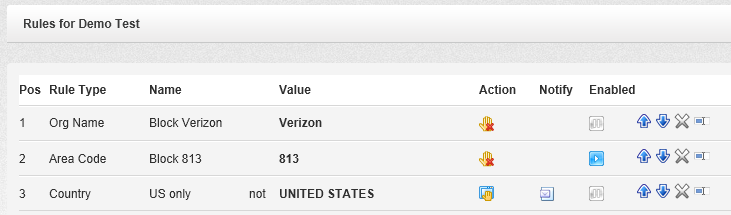
Now let's click on the Rules button. After you click on it, you will see the existing package rules:
Here you can see that this package already has 2 rules under positions 1 and 2.
Within the list, you can turn rules on and off, rearrange them according to their priorities, edit, or delete them.
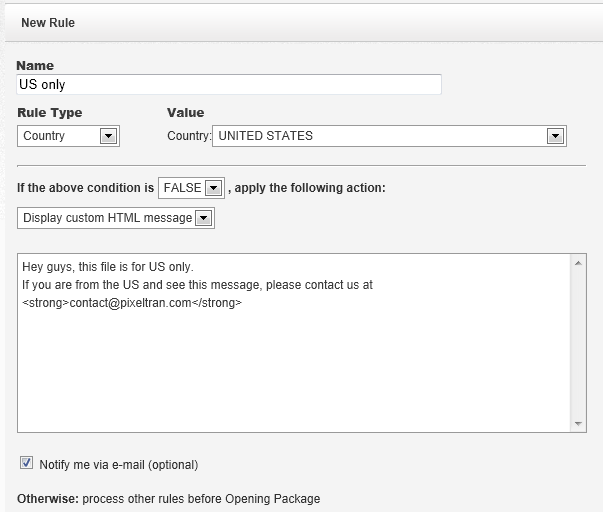
Let's add a new rule that would limit the package accessibility to US-only visitors.
We type the rule name, select Country for the rule type, then select the United States from the list of countries, as shown below. To complete the rule, we need to choose False to disallow all countries other than the US, and for the sake of the example, let's pick the Display HTML item from the list of actions.
Optionally, we can choose to receive an email message when the rule stops a visitor.
Once you save it, you will see the new rule appear in the list:
From now on, when a visitor from another country attempts to open the package link, they will be presented with the following screen:
Once this rule triggers, we will receive an email message telling us about the event.
Instead of displaying an HTML message, you can redirect the visitor to a different file package, suitable for their country, just by selecting another action. Or you can redirect the visitor to your website page where you explain the file download policies for foreign visitors.
Same for computer platforms. If you have different file packages for Apple and PC, we can redirect the visitor to the correct file download form depending on their machine type.
Here is another real life example when the package rules may be useful.
Let's say you are an insurance agent sending a document to your commercial line client. You know their company name. Let's say you underwrite Google, and you only want Google employees to be able to download the document.
In this case, choose the "Org Name" for the rule type, then type Google in the value field, and set the appropriate action. After that, no one outside the Google campus, or rather, no one outside Google network should be able to download the documents via the package link. Even if you post that link on Facebook.
Of course, there are exclusions. There are situations when a Google employee may be working from home, therefore their computer will not appear as coming from Google network. In this case, the rule will stop them, and they won't get your file.
On the other hand, you should be aware that no network is absolutely secure. There is software as well as hardware that can spoof a computer IP address. In this case, the perpetrator may get around the rules to get access to the package by using such software or hardware. To prevent unauthorized access, you may decide to add more rules, or better protect the package with a password. E-mail the package password to the intended recipient in a separate message, or better read it over the phone to them.
There are other situations when package rules may not work as intended. Some people when travel may connect to the internet via a cell phone, in that case the organization name will be AT&T, Sprint, or T-Mobile, regardless of the state they are in.
Others may be using computers configured to use proxy internet providers. An example of one such provider is America Online. They dynamically change IP addresses in a way that they may appear coming from different parts of country, or even another part of the world. You should be aware about this as well. If you know where your main customers are coming from, you should be able to set the rules accordingly.
Our system of rules is not an absolute tool for securing your data. It's simple and efficient, and lots of our customers use it on a daily basis. For others, it might be a good idea to utilize multiple protection layers. For the best results, it might be a good idea to first run a few reports to see what the download traffic looks like, before setting up the rules. Just be aware that no information is absolutely private or secure, once it has been published.